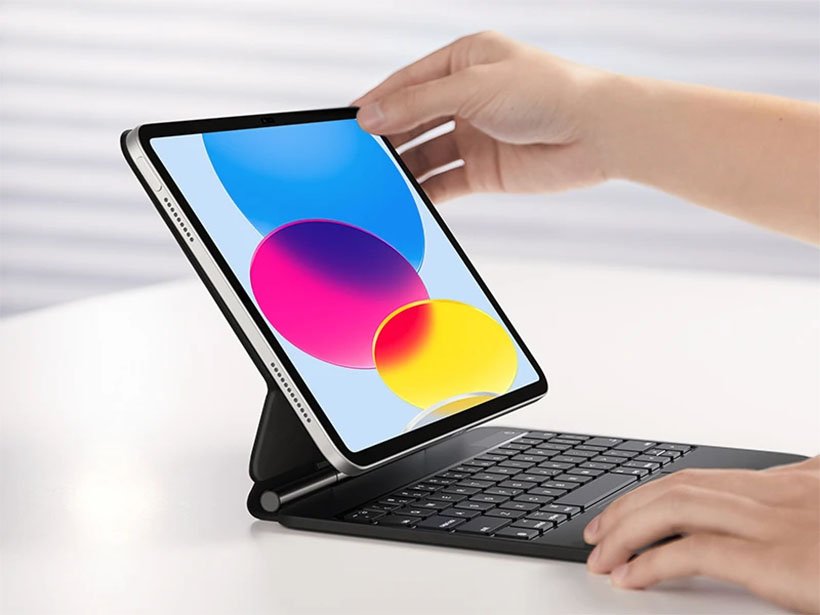
The iPad 10th Gen, a vibrant and capable device, truly shines as a productivity powerhouse when paired with the right external keyboard. Choosing the best keyboard for your iPad 10th Gen isn't just about typing; it's about transforming your tablet into a versatile workstation, unlocking features like precision trackpads, convenient shortcuts, and all-day comfort. This guide dives deep into iPad 10th Gen Keyboard Compatibility & Features, ensuring you pick the perfect companion to elevate your iPad experience.
At a Glance: Key Takeaways for iPad 10th Gen Keyboards
- Connectivity Matters: Look for Smart Connector keyboards for seamless, battery-free use, or Bluetooth options for broader compatibility and flexibility.
- Official Apple Option: The Apple Magic Keyboard Folio is designed specifically for the iPad 10th Gen, offering a great balance of features and integration.
- Top Third-Party Pick: The Logitech Combo Touch is often praised for its all-around protection, detachable keyboard, and excellent trackpad, making it a strong contender for the 10th Gen.
- Protection vs. Portability: Some keyboards offer robust case-like protection, while others prioritize slimness and portability. Consider your daily needs.
- Trackpads are Game-Changers: A trackpad dramatically improves navigation and productivity, especially for tasks requiring precision.
Why Your iPad 10th Gen Deserves a Keyboard Upgrade
Your iPad 10th Gen is more than just a media consumption device; it's a portable computer capable of serious work, creative projects, and efficient communication. While the on-screen keyboard is fine for quick messages, sustained typing on glass quickly leads to fatigue and slows you down.
Adding an external keyboard offers a multitude of benefits:
- Increased Typing Efficiency: Physical keys provide tactile feedback, allowing for faster and more accurate typing, essential for long emails, documents, or coding.
- Enhanced Comfort and Ergonomics: Maintaining better hand posture reduces strain and fatigue, making extended work sessions far more comfortable.
- Faster Navigation: Keyboard shortcuts and trackpad gestures empower quicker app switching, text selection, and overall interaction with iPadOS, transforming your workflow.
- Protection: Many keyboard options double as protective cases, safeguarding your iPad from everyday bumps and scratches.
Essentially, a good keyboard turns your iPad into a legitimate laptop rival, perfect for students, professionals, or anyone looking to maximize their tablet's potential.
Understanding iPad Keyboard Connectivity and Core Features
Before we dive into specific models compatible with your iPad 10th Gen, let's establish the two primary ways keyboards connect and what features you should prioritize.
Smart Connector vs. Bluetooth: The Power Dynamic
The biggest distinction in iPad keyboards lies in their connection method:
- Smart Connector Keyboards: These proprietary Apple connections are a game-changer for convenience. Found on specific Apple and third-party keyboards (like some Logitech models), the Smart Connector eliminates the need for Bluetooth pairing or separate power. You simply attach your iPad, and the keyboard instantly works, drawing minimal power directly from the iPad. This "plug-and-play" experience is incredibly seamless.
- Bluetooth Keyboards: Most third-party and some portable Apple keyboards (like the standalone Magic Keyboard) use Bluetooth. They connect wirelessly via your iPad's Bluetooth settings and require their own power source, typically a rechargeable battery (via USB-C) or replaceable button cells. The upside is broad compatibility – any Bluetooth keyboard can theoretically connect to your iPad. The downside is the need for pairing and recharging.
Key Features That Elevate the Experience
Modern iPad keyboards have evolved beyond simple typing tools. Here’s what to look for:
- Integrated Trackpads: A trackpad is arguably the most significant productivity booster. It brings mouse-like precision to your iPad, allowing for easier text selection, drag-and-drop, and navigation through complex interfaces without constantly reaching for the screen. iPadOS fully supports trackpads and mice, with gestures that mirror those on Mac.
- Function Key Rows: Many keyboards now include a dedicated row of function keys, offering quick access to common iPadOS features like screen brightness, volume control, media playback, Spotlight search, and even locking the screen. This saves valuable time by reducing the need to access Control Center.
- Pass-Through USB-C Ports: On some premium Smart Connector keyboards (like Apple's Magic Keyboard), a USB-C port on the keyboard allows you to charge your iPad while keeping the iPad's own USB-C port free for accessories like external drives or displays.
- Backlighting: Essential for working in low-light conditions, backlit keys significantly improve visibility and comfort.
- Protection: Many keyboard cases offer comprehensive protection for your iPad, often wrapping around the sides and back, not just the screen. This is a crucial consideration for a device that travels with you.
Official Apple Keyboards: Precision and Integration for Your iPad 10th Gen
Apple's own keyboards are renowned for their seamless integration with iPadOS and premium build quality. For the iPad 10th Gen, one specific official option stands out.
Apple Magic Keyboard Folio for iPad 10th Generation
This is Apple's tailor-made solution for the iPad 10th Gen, offering a unique two-part design that sets it apart.
- Compatibility: Exclusively designed for the iPad (A16 & 10th generation) with its 10.9-inch display.
- Key Features:
- Two-Part Design: Unlike the one-piece Magic Keyboard for Pro/Air, the Folio consists of a magnetic back panel stand and a separate, detachable keyboard panel. This allows for flexible use; you can easily remove the keyboard when you only need a stand for media consumption.
- Integrated Trackpad: Yes, it includes a trackpad, crucial for precise navigation and utilizing iPadOS gestures.
- Adjustable Stand: The magnetic stand allows for a range of adjustable viewing angles, perfect for typing, drawing, or watching videos.
- Smart Connector: Connects via Smart Connector, meaning instant pairing and no need for separate charging.
- Screen Protection: The keyboard panel can be magnetically attached to protect your iPad's screen when closed or traveling.
- Full Row of Function Keys: Provides quick access to iPadOS features like brightness, volume, and media controls.
While designed for versatility, some might find the two-part design less unified than a traditional folio. Nevertheless, for those seeking official Apple integration and a trackpad for their 10th Gen, the Magic Keyboard Folio is the benchmark.
Other Apple Keyboards (Not Direct 10th Gen Compatibility but for Context)
It's worth noting other Apple keyboards to understand the landscape, though they are not directly compatible with the iPad 10th Gen due to size and Smart Connector placement:
- Apple Magic Keyboard for iPad Pro/Air: This premium, one-unit design features a cantilever hinge for floating iPad display, a superb trackpad, backlit keys, and a pass-through USB-C port. It offers robust protection when closed. However, it's model-specific for the 11-inch & 13-inch iPad Pro (M4 & M5) and various iPad Air models (M2 & M3, 4th & 5th gen). Its design philosophy (one unit, wrap-around protection) differs from the Folio for the 10th Gen.
- Apple Magic Keyboard for iPad Air (Older Model): This older model is compatible with 13-inch iPad Air (M2 & M3), 11-inch iPad Air (M2 & M3), and iPad Air (4th & 5th gen). It's a one-unit design offering wrap-around protection and a trackpad but lacks the function keys found on the Magic Keyboard Folio for the 10th Gen.
Top Third-Party Keyboard Options for Your iPad 10th Gen
While Apple provides an excellent option, a vibrant market of third-party manufacturers offers compelling alternatives, often at a lower price point and with unique features.
Logitech Combo Touch for iPad (10th Gen)
Logitech is a long-standing leader in iPad accessories, and their Combo Touch is a perennial favorite, including a version specifically for the 10th Gen.
- Compatibility: Available for iPad (A16 & 10th gen and older), among other iPad models like the 11-inch iPad Pro (M4 & M5) and various iPad Airs.
- Key Features:
- All-Round Protection: Unlike some Apple options, the Combo Touch provides robust protection for the entire iPad, including the sides, thanks to its case design.
- Detachable Keyboard: Offers the flexibility to detach the keyboard when you just need the iPad and its stand.
- Adjustable Kickstand: The integrated kickstand allows for multiple viewing angles, perfect for typing, watching, or drawing.
- Smart Connector: Connects via Smart Connector, ensuring instant power and pairing.
- Large Trackpad: Features a generously sized trackpad that supports multi-finger gestures, enhancing productivity significantly.
- Full Row of Function Keys: Includes updated function keys for tasks like screenshots, Siri/dictation, and Do Not Disturb, streamlining your workflow.
- Lighter Redesign: The 2024 redesign focused on making the case lighter, improving portability without sacrificing protection.
The Logitech Combo Touch is a versatile alternative at a considerably lower price than Apple's Magic Keyboard (for Pro/Air) and offers excellent value, making it a strong recommendation for most iPad 10th Gen users.
Zagg Pro Keys for iPad (10th Gen)
Zagg is known for its protective and feature-rich keyboard cases. The Pro Keys series offers solid options for the iPad 10th Gen.
- Compatibility: Available for iPad (A16 & 10th gen), with models also available for iPad Pro and iPad Air.
- Key Features:
- Robust Protective Case: Designed with rubberized edges, it offers significant fall protection (up to 2 meters / 6.6 feet), making it ideal for those who need extra durability.
- Removable Bluetooth Keyboard: The keyboard connects magnetically to the case and operates via Bluetooth, offering flexibility to use it detached.
- Backlight: Features a backlight with 7 colors and 3 brightness levels, ensuring comfortable typing in various lighting conditions.
- Apple Pencil Compartment: Includes a convenient slot for storing and charging your Apple Pencil.
- Function Keys: A comprehensive row of function keys for device switching, home, sleep, app overview, media control, and volume.
- Automatic Sleep: The keyboard automatically goes to sleep when closed, conserving battery life.
- Lithium-ion Battery: Powered by a rechargeable lithium-ion battery via USB-C.
The Zagg Pro Keys offers a blend of strong protection and a versatile keyboard experience, particularly appealing if drop protection is a high priority for you.
Logitech Slim Folio for iPad (10th Gen)
For those prioritizing a straightforward, protective typing solution without a trackpad, the Logitech Slim Folio is an excellent choice.
- Compatibility: Specifically compatible with the iPad (10th generation), as well as older iPad models and iPad Air (3rd gen).
- Key Features:
- Lightweight and Good Design: Offers a slim profile and clean aesthetics, adding minimal bulk to your iPad.
- Quick and Easy Setup: Connects via Bluetooth, and setup is typically very fast.
- Shortcut Keys: Includes a top row of shortcut keys for quick access to functions like Spotlight search and the home screen.
- Stylus Holder: Features a convenient loop or holder for your stylus.
- Power: Uses 2 replaceable CR2032 batteries, offering long battery life.
The main trade-off here is the lack of a trackpad, but if you're comfortable relying on touch for navigation, the Slim Folio provides a great typing experience with solid protection.
ESR Rebound for iPad (10th Gen)
While the ESR Rebound 360 (which offers 360-degree rotation) is for Pro/Air models, ESR offers the standard Rebound keyboard case for the iPad 10th Gen.
- Compatibility: Standard iPad (10th Gen).
- Key Features:
- Good Protection: Offers decent all-round protection with a magnetic clasp that also secures an Apple Pen.
- Detachable Magnetic Case: The iPad case can be magnetically detached from the keyboard, providing flexibility.
- Firm, Responsive Keys: Provides a satisfactory typing experience with a row of function keys (volume, brightness, media controls, lock screen).
- Backlight: Often includes a backlight with multiple colors and brightness levels, which automatically turns off after 90 seconds of inactivity to save power.
- U.S. and U.K. keyboard layouts: Offers regional layout options.
Be mindful that the keyboard can be heavier than some alternatives, and the trackpad (if included in a specific model) might be relatively small. Also, backlighting, while useful, will reduce battery life.
Bluetooth Standalone and Specialty Keyboards for Your iPad 10th Gen
Beyond folio-style cases, a host of excellent standalone Bluetooth keyboards can pair with your iPad 10th Gen, offering unique advantages like multi-device switching or extreme portability.
Logitech Flip Folio for iPad
This model stands out for its multi-device connectivity and versatile stand.
- Compatibility: Recent iPad Air and iPad Pro models, but as a Bluetooth keyboard, it can connect to any current iPad, including the 10th Gen.
- Key Features:
- Multi-Device Connectivity: Can connect to up to three devices via Bluetooth, with easy switching between them—ideal if you use your keyboard with an iPhone or another tablet.
- Adjustable Kickstand: The versatile lid creates an adjustable stand, supporting the iPad from 10 to 70 degrees, even allowing for vertical placement.
- Detachable Bluetooth Keyboard: The keyboard itself is detachable, offering maximum flexibility.
- Power: Powered by four CR2016 button cells, providing up to 2 years of daily use.
A notable disadvantage is its lack of a trackpad and backlighting, making it more suited for users who prioritize multi-device use and a flexible viewing stand over an integrated pointing device.
Logitech Keys-To-Go 2 for iPad
For ultimate portability, this compact Bluetooth keyboard is hard to beat.
- Key Features:
- Basic, Compact, Portable: Designed to be incredibly thin (9mm thick) and lightweight (222g), making it perfect for slipping into any bag.
- Scissor Mechanism Keys: Provides a comfortable typing experience for its size.
- iPad-Specific Layout: Features an Apple-centric layout with a full row of function keys for iPadOS (brightness, volume, screenshots, multi-language layouts).
- Multi-Device Pairing: Can pair with up to 3 devices, similar to the Flip Folio.
While it's highly portable and sturdy, it lacks a trackpad, numeric keypad, and doesn't act as a stand or protective cover. It's a pure typing solution for on-the-go.
Logitech K780
If you need a robust, desktop-style experience with multi-device support, the K780 is a strong contender.
- Compatibility: All current and many past iPad models via Bluetooth.
- Key Features:
- Integrated Stand: Features a useful integrated stand along its top edge, perfect for holding your iPad (and even an iPhone simultaneously).
- Dedicated Device Switching Keys: Easily switch between up to three connected devices with the press of a button.
- Full-Size Layout: Offers a comfortable, full-size typing experience.
- Power: Uses 2 AAA batteries (included) for long life.
Its larger size and weight make it less portable than other options, but for a stationary setup or occasional travel where you need a more substantial keyboard, it's excellent.
Omoton Bluetooth and Wireless Rechargeable Keyboard
For budget-conscious buyers, Omoton offers a simple yet effective Bluetooth keyboard.
- Compatibility: All current and many past iPad models via Bluetooth.
- Key Features:
- Good Value: An affordable stand-alone Bluetooth keyboard.
- Quick and Easy Pairing: Simple to connect to your iPad.
- Backlighting: Includes backlit keys with 7 color options, a rarity at this price point.
- USB-C Charging: Modern charging standard for convenience.
- Function Keys: Dedicated keys for Spotlight and screenshots.
- ON/OFF Switch: Helps conserve battery.
While it delivers great features for its price, its thin plastic design might be more prone to breakage than premium options. It also lacks an integrated stand or protection.
Trackpads, Gestures, and Key Commands: Unleashing iPadOS Power
Whether you choose an Apple Magic Keyboard Folio, a Logitech Combo Touch, or any other keyboard with a trackpad, understanding how these components interact with iPadOS is crucial for productivity.
iPadOS versions fully support mouse and trackpad input, and the functionality has become incredibly refined. Here are some essentials:
- Multi-Touch Gestures: Just like on a Mac, trackpads enable powerful gestures:
- Two-finger scroll: Navigate through web pages, documents, and lists.
- Three-finger swipe up: Go to the Home screen.
- Three-finger swipe left/right: Switch between open applications.
- Two-finger click (or right-click): Access context menus in apps and on the Home screen.
- Pinch-to-zoom: Zoom in and out of content.
- Keyboard Shortcuts: Many familiar Mac key commands work seamlessly on iPadOS, significantly speeding up tasks.
Command + C,Command + X,Command + V: Copy, Cut, Paste.Command + Z: Undo.Command + Spacebar: Open Spotlight search, a powerful tool for finding apps, files, or information.Command + Tab: Quickly switch between your most recently used apps.Command + Shift + 3orCommand + Shift + 4: Take screenshots.- Discover More: To see all available shortcuts for the app you're currently using, simply long-press the Command key. A pop-up will display a list of relevant commands, a fantastic way to learn new shortcuts!
Mastering these trackpad gestures and key commands will dramatically transform your iPad 10th Gen into a far more efficient work machine. It’s an aspect that users often overlook but offers immense value. To dive deeper into how a keyboard can enhance your everyday tasks, consider exploring articles on keyboards for iPad 10th Gen that detail various use cases.
Making the Right Choice: Key Considerations for Your iPad 10th Gen Keyboard
With so many excellent options, how do you pick the perfect keyboard for your iPad 10th Gen? Here's a framework to guide your decision:
1. Your Primary Use Case
- Productivity Powerhouse: If your iPad is a primary work device for writing, spreadsheets, or presentations, prioritize a Smart Connector keyboard with an excellent trackpad and function keys (e.g., Apple Magic Keyboard Folio, Logitech Combo Touch).
- Casual Typing & Media: For occasional emails, notes, and lots of video watching, a detachable keyboard case or a simpler Bluetooth folio (e.g., Logitech Slim Folio, ESR Rebound) might suffice.
- Extreme Portability: If you need a keyboard you can literally take anywhere without adding bulk (e.g., Logitech Keys-To-Go 2), you'll likely sacrifice a trackpad and full protection.
- Multi-Device User: If you switch between your iPad, iPhone, and another computer, a multi-pairing Bluetooth keyboard (e.g., Logitech Flip Folio, K780) is invaluable.
2. Protection Needs
- All-Around Robustness: If your iPad frequently travels or is used in environments where drops are a concern, look for cases offering military-grade drop protection and full-side coverage (e.g., Logitech Combo Touch, Zagg Pro Keys, Zagg Rugged Book for other iPads if a version for 10th Gen becomes available).
- Screen Protection Only: A simple folio that covers the screen when closed is sufficient if you're careful (e.g., Apple Magic Keyboard Folio).
3. Trackpad or No Trackpad?
This is a critical question. A trackpad significantly enhances productivity and navigation.
- Yes, I need one: Prioritize models like the Apple Magic Keyboard Folio, Logitech Combo Touch, or Zagg Pro Keys with Trackpad.
- No, I'm fine with touch: You have more options and can save money by choosing models like the Logitech Slim Folio or standalone Bluetooth keyboards. The trade-off is often speed and precision.
4. Budget
iPad keyboard prices vary widely.
- Premium: Apple's official options are generally the most expensive but offer unparalleled integration.
- Mid-Range: Logitech and Zagg offer fantastic value, often matching Apple's features at a more accessible price point. The Logitech Combo Touch, for example, is a strong contender in this segment.
- Budget-Friendly: Standalone Bluetooth keyboards (e.g., Omoton) provide basic typing functionality for less.
5. Backlighting and Battery Life
- Working in Low Light: Backlit keys are a must for night owls or dimly lit environments. Be aware that backlighting typically reduces battery life.
- Battery Type: Consider if you prefer rechargeable internal batteries (USB-C charging) or replaceable button cells (often offering longer overall life but requiring specific batteries). Power consumption for most keyboards is very low.
6. Detachable vs. Fixed
- Detachable Keyboards: Offer maximum flexibility, allowing you to easily remove the keyboard when you only need a tablet or a stand (e.g., Apple Magic Keyboard Folio, Logitech Combo Touch, Zagg Pro Keys).
- Fixed Keyboard Cases: Provide a more integrated, laptop-like feel but can be less versatile for tablet-only use (less common for the 10th Gen).
For users wondering about specific accessories that cater to their needs, checking out detailed comparisons, such as the best iPad keyboards in 2026, can provide a broader perspective on the market.
The Testing Process: How Keyboards Prove Their Worth
Our insights into iPad keyboards aren't just theoretical; they're grounded in practical experience. We rigorously test iPad keyboards as part of our daily editorial work. This involves:
- Fit and Material Quality: Ensuring the iPad fits snugly, and the materials feel durable and premium.
- Typing Experience: Evaluating key travel, spacing, responsiveness, and overall comfort during extended typing sessions.
- Trackpad Performance: Testing accuracy, gesture recognition, and overall smoothness of navigation.
- Battery Life: Real-world usage to assess how long the keyboard lasts on a single charge or with its chosen power source.
- Connectivity Reliability: Ensuring consistent pairing and performance, especially for Bluetooth models.
- Feature Utility: Assessing the usefulness of function keys, backlighting, and pass-through ports.
This hands-on approach ensures our recommendations are based on actual performance and user experience, not just specifications.
Beyond the Keyboard: Optimizing Your iPad 10th Gen Setup
While a keyboard is a massive step, remember that your iPad 10th Gen's potential extends further. Consider pairing your keyboard with:
- Apple Pencil (USB-C or 1st Gen): For note-taking, drawing, and precise annotation, a stylus complements a keyboard perfectly.
- External Display: iPadOS supports external displays, allowing you to extend your workspace.
- Headphones: For focused work, a good pair of noise-canceling headphones can create an ideal environment.
By thoughtfully combining these accessories with the right keyboard, your iPad 10th Gen can truly rival the functionality of a laptop, offering portability, power, and versatility in one sleek package. For a comprehensive overview of how various accessories integrate with your iPad, you might find articles discussing keyboards for the iPad Pro 12.9-inch useful, as many features and principles apply across the iPad family. Additionally, comparing features with other models can inform your choices, such as looking at iPad Air 4th Generation keyboard options for shared design philosophies.
Your iPad 10th Gen: Ready for Anything
Choosing the right keyboard for your iPad 10th Gen is an investment in your productivity and enjoyment. Whether you opt for the official Apple Magic Keyboard Folio, the versatile Logitech Combo Touch, or a robust Zagg Pro Keys, the goal is to enhance your typing comfort, navigation speed, and overall ability to get things done. The ground truth points to a strong ecosystem of accessories designed to turn your iPad into a flexible, powerful tool, capable of adapting to your workflow, whether you're typing up a report in a cafe or managing emails on the go.
The key is to match the keyboard's features—its connectivity, trackpad presence, level of protection, and price—to your specific needs. With the detailed compatibility and feature breakdown provided here, you're now equipped to make an informed decision and unlock the full potential of your iPad 10th Gen. And for broader insights into maximizing your iPad's capabilities with essential accessories, resources like accessories for the iPad Pro often highlight innovative solutions that cross over to the standard iPad experience.